A practical guide to workstation setup, movement and building the strength to tolerate a working day.

A laptop or poorly positioned screen can encourage sustained neck bending and shoulder tension.
September often means returning to a more structured working routine. After a summer spent moving more, travelling or simply spending less time at a desk, suddenly sitting in front of a screen for eight hours a day can place a sustained load on tissues that have become accustomed to moving more freely.
It is rarely one “bad posture” that causes the problem. More often, symptoms develop because we remain in the same position for too long, particularly when the workstation does not support us well or the body is not yet conditioned for the demands of a full working day.
Start with your chair
Take time to learn how your chair works rather than accepting the position in which you find it. Your feet should be supported on the floor or a footrest, with your hips approximately level with or slightly higher than your knees. Sit back so the backrest supports you, and position the armrests so your shoulders can remain relaxed.
Is your chair actually working?
If it is broken, stuck or cannot be adjusted, report it to your office manager and request a workstation reassessment. Employers must assess workstations used regularly for display-screen work and address identified risks.
Check your screen height
Screens are often positioned too low rather than too high, causing people to look down and gradually bring their head and shoulders forwards. Position the screen directly in front of you, with the main working area at a comfortable eye level. You should be able to see it without repeatedly looking down, leaning forwards or turning your head.
If you use two screens, place the one you use most directly in front of you. If both are used equally, position yourself centrally between them.
Use the forearm-sweep test
One of the simplest ways to arrange your desk is to divide it into three working zones. The zones are individual to you: they are created by your own reach, not by an arbitrary line drawn on the desk.
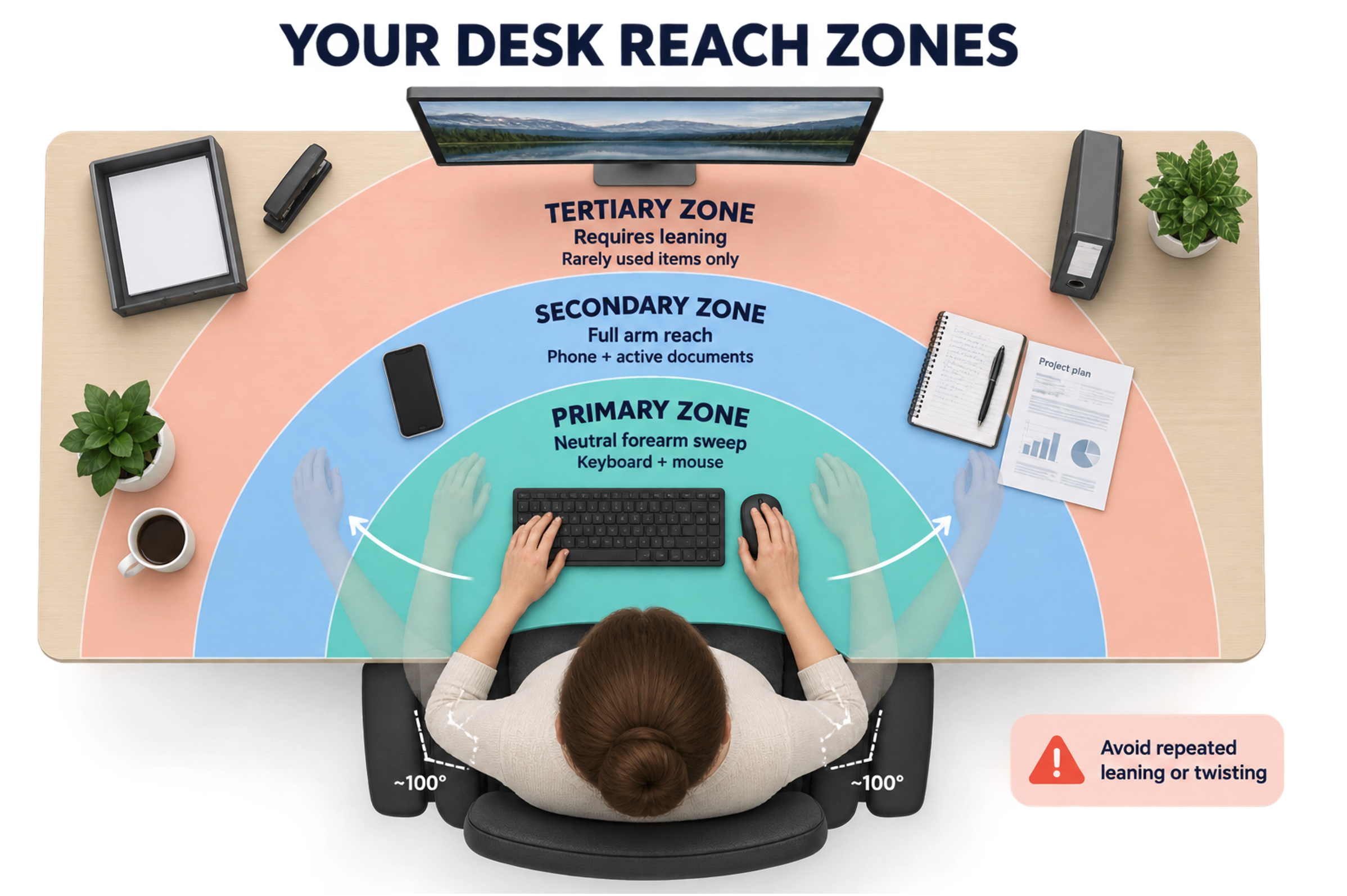
Your three desk-reach zones: keep continuously used equipment inside the neutral forearm sweep.
The primary work zone
Keep your elbows comfortably beside your ribs and bent to approximately 90–110 degrees. Sweep your forearms from side to side in a semicircle. This creates your primary or neutral reach zone.
Your keyboard and mouse should sit inside this area because you use them continuously. Keep the mouse immediately beside the keyboard and on the same surface level. The keyboard will usually sit quite close to the front of the desk, but the real test is whether you can type without reaching forwards, lifting your shoulders or allowing your elbows to drift away from your body.
The secondary work zone
Straighten your arm in front of you without leaning forwards. This creates your secondary zone. Items used regularly, but not continuously, can sit here for example your telephone, current paperwork, notebook or water bottle.
The tertiary work zone
Anything that requires you to bend forwards, stretch or twist sits in the tertiary zone. Reserve it for rarely used items such as storage trays, reference folders or a stapler. If you use an item frequently, move it closer rather than repeatedly adapting your body to reach it.

Do not work directly from a laptop or iPad all day
Laptops and tablets are portable, but they are not designed for comfortable, prolonged desk work. If you regularly use one, place it on a stand so the screen is raised and use a separate keyboard and mouse. This allows the screen, keyboard and chair to be positioned independently.
The same principle applies to paper documents. Use a document holder and place it directly in front of you, preferably close to the screen. Keeping papers on one side can lead to hours of repeated neck rotation.
The best position is your next position
Even a beautifully arranged workstation will not protect you if you remain completely still all day. Take frequent, short breaks and change activity whenever you can. Stand while making a telephone call, walk to speak to a colleague and leave your desk at lunchtime. The Health and Safety Executive advises that short, frequent breaks are preferable to occasional longer ones.
A sit–stand desk can help, but standing all day is not the answer. Start with short periods of standing around 10–20 minutes at a time and continue changing position regularly. Most importantly, do not eat lunch at your desk: go outside and move.
Treatment involves more than hands-on therapy
Neck and back pain related to desk work is not always resolved simply by treating the painful area. Hands-on treatment may help settle symptoms, but lasting improvement often comes from identifying which tissues are being overloaded, changing the habits contributing to that load and gradually improving strength and physical capacity.
Research into work-related neck pain supports targeted strengthening exercise, particularly for people who already have symptoms. This is why our treatment plans commonly combine symptom relief with individualised strength work, movement advice and practical changes to the working day.
Can desk work contribute to headaches?

Headaches associated with desk work may arise from the neck, but other causes must also be considered.
Desk-related neck problems can contribute to headaches, particularly pain arising from the upper neck and surrounding muscles. These are often described as cervicogenic or posturally related headaches. We assess the neck, working habits and other potential contributors rather than assuming every headache is caused by posture.
Our experienced spinal physiotherapists work closely with our spinal consultant colleagues. If symptoms are complex, persistent or require further investigation, we can help ensure that patients receive the appropriate specialist opinion.
Do you need help with your workstation?
Complex workstation assessments with Sarah Lawson
Sarah personally provides more complex workstation assessments. These can be completed in person for workplaces within approximately a 15-minute walk of The Lansdowne Club, or online for those further away. An online assessment allows Sarah to review positioning, equipment and working habits and recommend changes, but she cannot physically adjust the chair, desk or equipment remotely.
If your neck pain, back pain or headaches continue despite making simple changes, contact Physio Remedies for an individual assessment.